 |
"Be Certified IT Professionals, Start Here"
ผู้เข้าอบรมกว่า 20,000 ท่าน จากกว่า 4,000 บริษัท ตั้งแต่ปี พ.ศ. 2548 |
 |

รวมเทคนิคแก้ปัญหา Network & Server
https://www.itcert2005.com/article.htm
|
"Be Certified IT Professionals, Start Here"
ผู้เข้าอบรมกว่า 20,000 ท่าน จากกว่า 4,000 บริษัท ตั้งแต่ปี พ.ศ. 2548 |
|
รวมเทคนิคแก้ปัญหา Network & Server
https://www.itcert2005.com/article.htm
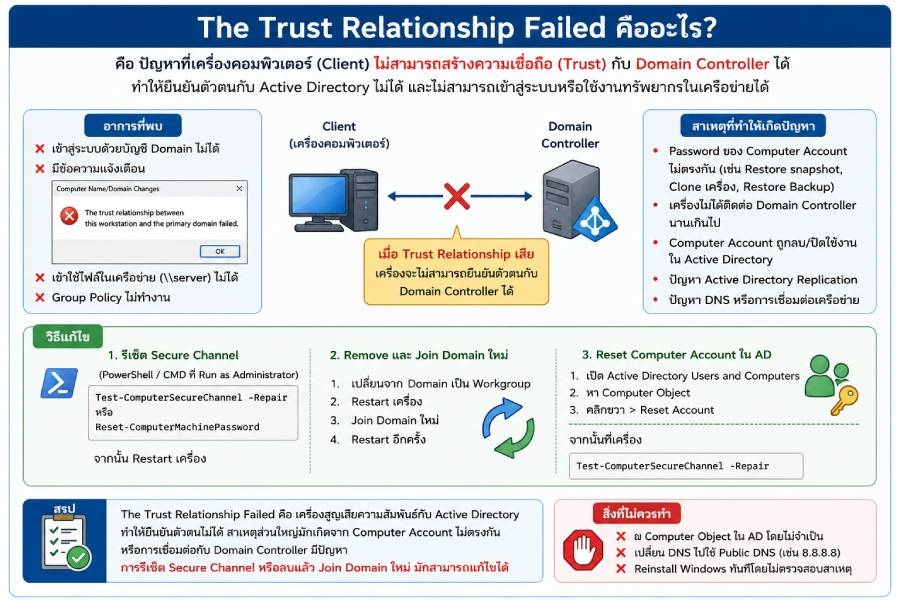
The Trust Relationship Between This Workstation and the Primary Domain Failed เป็นปัญหาที่พบได้บ่อยในเครื่อง Windows ที่ Join Domain กับ Active Directory (AD) โดยหมายความว่า
❌ เครื่องคอมพิวเตอร์ไม่สามารถยืนยันตัวตนกับ Domain Controller ได้อีกต่อไป
👉 เปรียบเทียบง่ายๆ เหมือนพนักงานมีบัตรพนักงานที่เคยใช้เข้าออฟฟิศได้ แต่ข้อมูลในระบบส่วนกลางไม่ตรงกับบัตรแล้ว ทำให้ถูกปฏิเสธการเข้าใช้งาน
🔷 อาการที่พบ
❌ Login ด้วยบัญชี Domain ไม่ได้
❌ ขึ้นข้อความ
The Trust Relationship Between This Workstation
and the Primary Domain Failed
❌ เข้า Shared Folder ไม่ได้
❌ ใช้งาน Group Policy ไม่ได้
❌ เครื่องติดต่อ Domain Controller ไม่สำเร็จ
สาเหตุหลักที่เจอบ่อย
🔷 1. Computer Account ใน AD ไม่ตรงกับเครื่อง
ทุกเครื่องที่ Join Domain จะมี Password ของ Computer Account
หาก Password ฝั่งเครื่องและฝั่ง AD ไม่ตรงกัน จะเกิด Error นี้
สาเหตุเช่น :
• Restore VM Snapshot เก่า
• Restore Backup เครื่อง
• Clone VM
• ย้าย Storage แล้ว Rollback
🔷 2. เครื่องไม่ได้ติดต่อ Domain Controller นานเกินไป
เช่น :
• ปิดเครื่องเกิน 30 วัน
• Laptop ไม่ได้ต่อ VPN กลับเข้ามาองค์กรนาน
👉 เมื่อ Password Computer Account เปลี่ยนใน AD แต่เครื่องยังใช้ค่าเดิม จึงเกิดปัญหา Trust Relationship
🔷 3. Computer Account ถูกลบใน AD
ผู้ดูแลระบบอาจจะ
• Delete Computer Object
• Disable Computer Account
• ย้าย OU ผิดพลาด
👉 ทำให้เครื่องหา Account ตัวเองไม่เจอ
🔷 4. Active Directory Replication มีปัญหา
กรณีมีหลาย Domain Controller
• AD Sync ไม่ครบ
• Replication Error
👉 ข้อมูล Computer Account ไม่ตรงกัน
🔷 5. Snapshot VM ย้อนกลับ
พบบ่อยมากใน VMware และ Hyper-V
ตัวอย่าง
1. Join Domain วันที่ 1
2. AD เปลี่ยน Password Computer Account หลายครั้ง
3. Restore Snapshot วันที่ 1
เครื่องกลับไปใช้ Password เก่า
👉 จึง Login Domain ไม่ได้
🔷 วิธีการตรวจสอบ
✅ ตรวจสอบการเชื่อมต่อ Domain
เปิด CMD
echo %logonserver%
👉 หากไม่พบ Domain Controller อาจมีปัญหา Network หรือ DNS
✅ ตรวจสอบ Secure Channel
เปิด PowerShell แบบ Administrator
Test-ComputerSecureChannel
ผลลัพธ์
False
👉 แสดงว่า Trust Relationship เสีย
✅ ตรวจสอบ DNS
เปิด CMD
nslookup yourdomain.local
👉 ต้องตอบกลับ IP ของ Domain Controller ได้
🔷 วิธีแก้ไขที่ถูกต้อง
✅ วิธีที่ 1 : รีเซ็ต Secure Channel
PowerShell Administrator
Test-ComputerSecureChannel -Repair
หรือ
Reset-ComputerMachinePassword
จากนั้น Restart เครื่อง
✅ วิธีที่ 2 : Remove และ Join Domain ใหม่
1. Login ด้วย Local Administrator
2. เปลี่ยนจาก Domain เป็น Workgroup
System Properties
-> Computer Name
-> Change
-> Workgroup
3. Restart
4. Join Domain ใหม่
System Properties
-> Computer Name
-> Change
-> Domain
5. Restart เครื่องอีกครั้ง
👉 วิธีนี้แก้ได้เกือบทุกกรณี
✅ วิธีที่ 3 : Reset Computer Account ใน AD
บน Domain Controller
1. เปิด Active Directory Users and Computers
2. หา Computer Object
3. คลิกขวา
4. Reset Account
จากนั้นที่เครื่องมีปัญหา
Test-ComputerSecureChannel -Repair
🔷 สิ่งที่ไม่ควรทำ
❌ Delete User Account โดยไม่จำเป็น
❌ ลบ Computer Object โดยไม่วิเคราะห์สาเหตุก่อน
❌ Reinstall Windows ทันที
❌ เปลี่ยน DNS เป็น Google DNS (8.8.8.8)
🔷 สรุปสุดท้ายแบบสั้นเข้าใจง่าย
The Trust Relationship Failed คือปัญหาที่เครื่อง Windows สูญเสียความสัมพันธ์ (Trust) กับระบบ Active Directory ทำให้ Domain Controller ไม่สามารถยืนยันตัวตนของเครื่องได้
สาเหตุที่พบบ่อยที่สุดคือ
1. Restore Snapshot หรือ Backup เก่า
2. เครื่องไม่ได้เชื่อมต่อ Domain นาน
3. Computer Account ใน AD มีปัญหา
4. AD Replication ผิดพลาด
5. DNS หรือการเชื่อมต่อ Domain Controller มีปัญหา
👉 วิธีแก้ที่ใช้บ่อยที่สุดคือ Reset Computer Account, Repair Secure Channel หรือ Remove แล้ว Join Domain ใหม่ ซึ่งมักแก้ปัญหาได้รวดเร็วและมีประสิทธิภาพที่สุด‼️
หน้าแรก | หลักสูตรอบรม | โปรโมชั่น | ตารางอบรม | บรรยากาศการอบรม | วิทยากร | ข่าวสาร | เกี่ยวกับเรา | ติดต่อเรา | หลักสูตร ONLINE
บริษัท ไอทีซี เทรนนิ่ง เซ็นเตอร์ จำกัด (ศูนย์อบรม ITCert)
เลขที่ 119/20 อาคาร ไอ.เอ็ม สแควร์ หมู่ที่ 5 ต.ปากเกร็ด อ.ปากเกร็ด จ.นนทบุรี 11120 
เบอร์ติดต่อ / Tel. 02-001-8200, 063-337-1483, 061-658-8288
Website : https://www.itcert2005.com | Facebook Fanpage : https://www.facebook.com/ITcert2005
Line OA: @itcert2005 